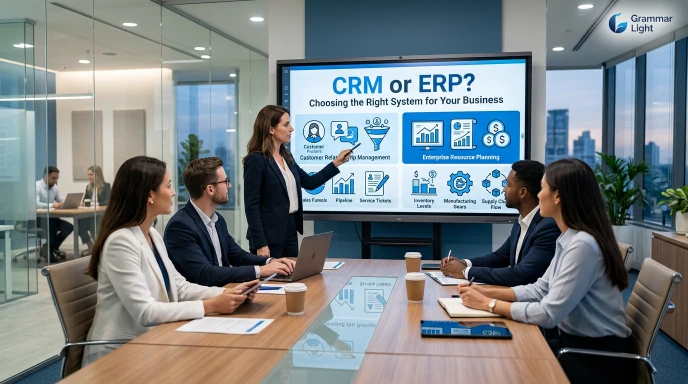
CRM and ERP are both business software systems, but they solve different problems. A CRM focuses mainly on customers, sales, leads, and relationships, while an ERP manages finance, inventory, purchasing, operations, employees, and other internal business processes.
Choosing between CRM and ERP depends on what a business needs to manage and where it wants to improve efficiency.
What Is CRM?
CRM stands for Customer Relationship Management. It is software designed to help businesses manage interactions with current and potential customers.
A CRM keeps customer information organized in one place. Sales teams can use it to track leads, follow up with prospects, manage sales opportunities, and maintain customer relationships.
For example, when a potential customer contacts a company, a CRM can store their contact details, record previous conversations, track follow ups, and show the current stage of the sales process.
Main Purpose of CRM
The main purpose of CRM is to help businesses attract customers, increase sales, and maintain stronger customer relationships.
A CRM can help teams:
- Store customer contact information
- Track leads and prospects
- Manage sales pipelines
- Schedule follow ups
- Record customer interactions
- Improve customer service
- Monitor sales performance
- Manage marketing campaigns
What Is ERP?
ERP stands for Enterprise Resource Planning. It is a business management system that connects different internal operations through one centralized platform.
An ERP can manage areas such as accounting, inventory, purchasing, supply chain, production, human resources, and order management.
For example, when a company receives an order, an ERP system can connect the order with inventory, accounting, purchasing, and fulfillment processes.
Main Purpose of ERP
The main purpose of ERP is to help businesses manage internal operations efficiently and keep important business information connected.
An ERP can help companies:
- Manage accounting and finances
- Track inventory
- Manage purchasing
- Monitor supply chains
- Handle production processes
- Manage orders
- Track business expenses
- Manage employee information
CRM vs ERP: Key Difference
The biggest difference between CRM and ERP is their primary focus.
CRM focuses on the customer side of the business, while ERP focuses on the internal side of the business.
A CRM helps answer questions such as:
- Who are our customers?
- Which leads are ready to buy?
- When should we contact a prospect?
- How much revenue is in the sales pipeline?
- How can we improve customer relationships?
An ERP helps answer questions such as:
- How much inventory do we have?
- What are our expenses?
- What products need to be purchased?
- How much money is the business making?
- How are our internal operations performing?
CRM vs ERP Comparison Table
| Feature | CRM | ERP |
| Main focus | Customers and sales | Business operations |
| Primary users | Sales and customer service teams | Finance, operations, purchasing, HR, and management |
| Customer management | Strong | Basic or integrated |
| Sales management | Strong | Usually limited |
| Inventory management | Limited | Strong |
| Accounting | Limited | Strong |
| Purchasing | Limited | Strong |
| Marketing | Strong | Limited |
| Supply chain | Limited | Strong |
| Business reporting | Sales focused | Company wide |
| Main goal | Improve customer relationships and sales | Improve internal efficiency and resource management |
How CRM and ERP Can Work Together
CRM and ERP can work together by connecting customer data with business operations, allowing teams to manage relationships, sales, finance, inventory, and other internal processes more efficiently.. Many businesses use both CRM and ERP because they handle different parts of the business.
The CRM can manage the customer journey from the first contact to the sale. Once an order is placed, the ERP can manage inventory, billing, fulfillment, and other internal processes.
For example:
CRM: Lead → Follow up → Sales Opportunity → Customer Order
ERP: Customer Order → Inventory → Invoice → Payment → Fulfillment
When these systems are connected, customer facing and internal teams can work with more consistent information.
CRM vs ERP: Which One Does a Business Need?
A business that mainly needs better sales tracking, lead management, and customer communication may benefit more from a CRM.
A business struggling with inventory, accounting, purchasing, production, or internal operations may need an ERP.
Larger businesses may eventually need both systems because their customer management and internal operations become too complex for a single application.
Simple Rule to Remember
CRM manages relationships. ERP manages resources.
CRM helps a business sell and serve better, while ERP helps a business operate and manage better.
CRM vs ERP: Features, Benefits, and Business Use Cases
Both CRM and ERP systems can improve business performance, but their features are designed for different areas of an organization.When comparing their roles, CRM centers on customers and revenue generation, whereas ERP connects internal business processes and resources.
CRM Features
Through CRM software, businesses can manage customer relationships, organize sales activities, and improve customer interactions more effectively.
Lead Management
A CRM allows businesses to collect and organize information about potential customers. Sales teams can see where each lead is in the buying process and determine which prospects need follow up.
Contact Management
CRM systems store important customer details, including names, contact information, previous interactions, and sales history. This gives employees a clearer view of each customer.
Sales Pipeline Management
A CRM can show different stages of the sales process, from an initial inquiry to a completed purchase. This helps sales teams identify opportunities and manage their pipeline.
Customer Service
CRM platforms can help support teams track customer questions, complaints, and requests. Employees can review previous interactions before responding to a customer.
Marketing Management
Many CRM systems include tools for managing email campaigns, customer segments, and marketing activities. These features can help businesses communicate with the right audience.
ERP Features
ERP software focuses on connecting the internal functions that keep a business running.
Financial Management
ERP systems can manage areas such as invoices, expenses, accounts, payments, and financial reporting. This gives businesses a centralized view of their financial activities.
Inventory Management
An ERP can track products, stock levels, warehouses, and inventory movements. Businesses can use this information to reduce shortages and avoid holding unnecessary stock.
Purchasing
ERP software can help businesses manage suppliers, purchase orders, and procurement activities. This makes it easier to track what the company needs to buy and when it needs to be purchased.
Supply Chain Management
Companies that depend on suppliers, warehouses, transportation, and distribution can use ERP systems to coordinate these activities more efficiently.
Human Resources
Some ERP platforms include HR features for managing employee information, payroll, attendance, benefits, and other workforce processes.
CRM Benefits for Businesses
CRM software can provide several advantages for companies that want to improve customer facing activities.
Better customer organization is one of the biggest benefits because customer information can be stored in a centralized system.
Other benefits include:
- Better lead tracking
- Faster customer follow ups
- Improved sales visibility
- More organized customer service
- Better communication between sales teams
- Easier sales performance tracking
- Stronger customer relationships
ERP Benefits for Businesses
ERP systems can improve how different departments work together by connecting business information in one platform.
Key benefits include:
- Better financial control
- Improved inventory accuracy
- More efficient purchasing
- Reduced duplicate data
- Better coordination between departments
- Centralized business information
- Improved operational reporting
- More efficient business processes
CRM vs ERP: Which Departments Use Them?
The departments using CRM and ERP can be quite different because each system serves a different business purpose.
CRM is commonly used by:
- Sales
- Marketing
- Customer service
- Business development
- Account management
ERP is commonly used by:
- Finance
- Accounting
- Operations
- Purchasing
- Inventory
- Supply chain
- Human resources
- Production
Some departments may use information from both systems when the two platforms are integrated.
CRM vs ERP: Cost Difference
The cost of CRM and ERP software can vary significantly depending on the provider, number of users, features, implementation requirements, and company size.
A basic CRM may be relatively simple to implement, particularly for a small sales team. An ERP can require a more extensive implementation because it may connect several departments and business processes.
However, the cheapest option is not always the best option. Businesses should consider the processes they need to manage, the number of users, integration requirements, and expected long term value before selecting a system.
CRM vs ERP: Which Is Easier to Implement?
CRM systems are generally easier to introduce when a business only wants to improve customer and sales management.
ERP implementation can be more complex because it may involve finance, inventory, purchasing, operations, employees, and multiple departments at the same time.
A successful ERP implementation may therefore require more planning, employee training, data migration, and process changes.
CRM vs ERP for Small Businesses
Small businesses often start with a CRM when their biggest challenge is managing leads, customers, and sales.
An ERP becomes more valuable when the business grows and needs stronger control over inventory, accounting, purchasing, orders, or other internal operations.
For a small service based company, a CRM may be enough at first. For a growing manufacturing or retail business, an ERP may become increasingly important.
CRM vs ERP: Integration, Implementation, and Business Needs
Depending on a company’s size, goals, and daily operations, CRM and ERP systems may function separately or operate as connected solutions.
CRM and ERP Integration
By linking the two systems, businesses can share essential information between customer facing teams and internal departments, creating a more connected workflow.
For example, a customer order created through a CRM can be transferred to an ERP system for inventory management, invoicing, payment processing, and delivery.
Integration can reduce manual data entry and help teams work with more consistent information.
CRM vs ERP Implementation
Implementing a CRM is often simpler when a company only needs to improve sales and customer management.
ERP implementation can require more planning because it may affect several departments, including finance, inventory, purchasing, operations, and human resources.
Successful implementation usually involves data migration, employee training, system configuration, and testing.
CRM for Service Based Businesses
CRM software can be particularly useful for businesses that mainly provide services rather than physical products.
Examples include:
- Marketing agencies
- Consulting firms
- Real estate companies
- Customer support businesses
- Professional service providers
These businesses often need to track leads, clients, communication, appointments, and sales opportunities.
ERP for Product Based Businesses
ERP systems can be especially valuable for companies that manage physical products and complex operations.
Examples include:
- Manufacturing companies
- Retail businesses
- Distributors
- Wholesalers
- Large e commerce businesses
These organizations may need to coordinate inventory, purchasing, warehouses, suppliers, accounting, and orders.
CRM vs ERP: Which One Should You Start With?
The right starting point depends on the biggest challenge facing the business.
If the main problem is losing leads, missing follow ups, or managing customer information, starting with CRM may make sense.
If the main problem is inventory control, accounting, purchasing, or disconnected internal operations, an ERP may be more appropriate.
Some businesses eventually adopt both as their operations become more complex.
Frequently Asked Questions About CRM vs ERP
Which Is Better, CRM or ERP?
Neither is automatically better. CRM is better for customers, sales, leads, and relationships, while ERP is better for finance, inventory, purchasing, operations, and internal resources. Businesses with broader requirements may use both.
What Is an ERP or CRM System?
An ERP system manages internal business processes such as accounting, inventory, purchasing, and operations. A CRM system manages customer related activities such as leads, sales, communication, and customer service.
Is SAP an ERP or a CRM?
SAP is primarily known for ERP software, although the company also provides CRM and customer experience solutions. Its ERP systems help businesses manage areas such as finance, supply chain, procurement, manufacturing, and operations.
What Is CRM and Examples?
CRM stands for Customer Relationship Management. It is software used to manage customer information, leads, sales activities, communication, and service. Examples include Salesforce, HubSpot CRM, and Zoho CRM.
Is Excel a CRM Software?
Excel is not dedicated CRM software, but businesses can use spreadsheets to track customer names, contact details, leads, sales, and follow ups. Dedicated CRM platforms provide specialized features such as automated workflows, sales pipelines, customer records, and reporting.
Is Salesforce a CRM or ERP?
Salesforce is primarily a CRM platform. It helps businesses manage sales, customer service, marketing, leads, and customer relationships. It is not primarily an ERP system.
CRM vs ERP: Quick Decision Guide
Use this simple guide to identify which system may fit your business:
| Business Need | Better Fit |
| Managing leads | CRM |
| Tracking customers | CRM |
| Improving sales | CRM |
| Customer service | CRM |
| Managing inventory | ERP |
| Accounting and finance | ERP |
| Purchasing | ERP |
| Supply chain management | ERP |
| Production management | ERP |
| Managing both customers and operations | CRM + ERP |
CRM vs ERP: Key Takeaway
CRM helps a business manage customers and generate revenue, while ERP helps manage resources and internal operations. The best choice depends on what the business needs to improve most. For companies with complex customer and operational requirements, using an integrated CRM and ERP setup can provide the most complete solution.
CRM vs ERP: Scalability, Automation, and Long Term Business Value
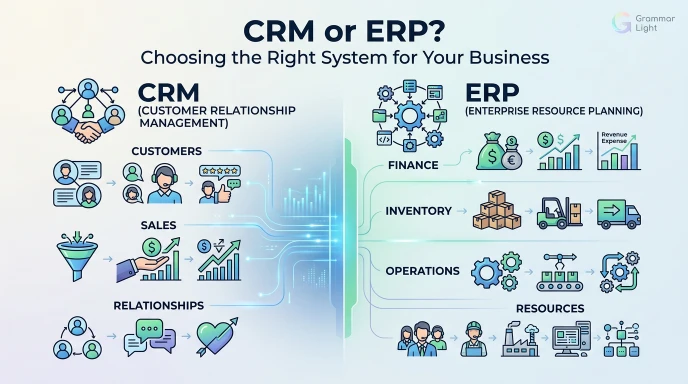
As a business grows, its software needs can change. CRM and ERP systems can help companies handle increasing data, automate repetitive work, and improve decision making.
Scalability of CRM and ERP
Scalability means a system can continue supporting a business as its customers, employees, transactions, and operations increase.
A CRM can scale with a growing sales team by handling more leads, contacts, opportunities, and customer interactions.
An ERP can scale by supporting more products, warehouses, suppliers, transactions, employees, and business locations.
Automation in CRM
CRM systems can automate many repetitive customer and sales activities.
For example, a CRM may automatically:
- Send follow up reminders
- Assign leads to sales representatives
- Update sales stages
- Send customer emails
- Create tasks for sales teams
- Generate sales reports
Automation allows employees to spend less time on repetitive administrative tasks.
Automation in ERP
ERP systems can automate many internal business processes.
Examples include:
- Generating invoices
- Updating inventory after sales
- Creating purchase orders
- Processing financial records
- Tracking expenses
- Generating business reports
This can help reduce manual work and improve the accuracy of business information.
CRM vs ERP Reporting
CRM reporting is generally focused on customers, sales, leads, and revenue opportunities.
Businesses can use CRM reports to understand sales performance, conversion rates, customer activity, and pipeline value.
ERP reporting focuses more broadly on finance, inventory, purchasing, operations, and overall business performance.
This allows managers to analyze how different parts of the company are performing.
CRM vs ERP for Business Growth
CRM can support growth by helping companies manage more customers and sales opportunities without relying entirely on spreadsheets or manual records.
ERP can support growth by helping companies manage increasing operational complexity.
For example, a growing retailer may need an ERP when it begins managing multiple warehouses, larger inventories, more suppliers, and higher transaction volumes.
CRM vs ERP and Decision Making
Both systems can improve decision making by providing centralized and organized information.
CRM data can help managers understand:
- Which products or services generate more sales
- Which leads are most valuable
- How sales teams are performing
- Where customers are in the buying process
ERP data can help managers understand:
- Business expenses
- Inventory levels
- Supplier performance
- Cash flow
- Operational costs
- Overall financial performance
CRM vs ERP: User Experience
A CRM is usually designed around customer facing activities, making it particularly useful for sales, marketing, and service teams.
An ERP typically serves a wider range of departments and may have more complex workflows because it manages multiple areas of the business.
The best system should be easy enough for employees to use consistently while still providing the features the business requires.
CRM vs ERP: Long Term Value
The long term value of a CRM or ERP depends on how well the system solves a company’s actual problems.
A CRM can provide strong value when it helps a company increase sales, improve customer retention, and organize customer information.
An ERP can provide strong value when it helps a company control costs, improve operations, manage resources, and reduce inefficiencies.
The goal should not simply be to choose the system with the most features. The better approach is to select software that matches the company’s processes and future plans.
CRM vs ERP: Can Excel Replace Them?
Excel can work for basic record keeping, especially for a small business with limited data.
However, as a company grows, spreadsheets can become difficult to manage because information may be duplicated, updated manually, or stored across multiple files.
CRM and ERP systems are designed specifically for business processes and can provide automation, user permissions, centralized data, workflows, and specialized reporting.
CRM vs ERP: Final Choice for Different Businesses
There is no single solution that works for every company.
Choose a CRM if your main focus is customer relationships, sales, marketing, or service.
An ERP makes more sense when finance, inventory, purchasing, operations, or resource management is the main focus.
Both systems can work well when you need effective customer management alongside comprehensive internal operations.
Ultimately, CRM and ERP serve different purposes, and understanding those differences makes it easier to select the right technology for long term business growth.CRM vs ERP: Advantages, Limitations, and Future Business Needs
Understanding the strengths and limitations of CRM and ERP systems can help businesses make a more practical technology decision. Each system offers value in different areas and may be more suitable at different stages of business growth.
Advantages of CRM
A CRM can make customer and sales management more organized by keeping important information in one place.
Key advantages include:
- Better lead organization
- Faster customer follow ups
- Improved sales visibility
- Centralized customer information
- Better customer service
- Automated sales tasks
- Easier performance tracking
A CRM can be especially valuable when a company has a growing number of customers and sales opportunities.
Limitations of CRM
CRM software is not designed to manage every part of a business.
Depending on the platform, it may have limited capabilities for areas such as accounting, manufacturing, inventory, and supply chain management.
A business with complex internal operations may therefore need an ERP in addition to its CRM.
Advantages of ERP
ERP systems bring multiple internal processes together in a centralized environment.
Important advantages include:
- Better financial management
- Improved inventory control
- Centralized business data
- More efficient purchasing
- Better operational visibility
- Reduced duplicate information
- Improved coordination between departments
An ERP can be particularly useful for businesses with complex operations and multiple departments.
Limitations of ERP
ERP systems can be more complex than basic business software because they often cover many different functions.
Implementation may require employee training, data migration, process changes, and ongoing system management.
For a very small business that only needs simple customer and sales tracking, a full ERP may provide more functionality than necessary.
CRM vs ERP for Remote Teams
Both CRM and ERP systems can support employees working from different locations, particularly when the software is cloud based.
A CRM allows sales and service teams to access customer information and update activities from different locations.
An ERP can give finance, operations, purchasing, and management teams access to shared business information without requiring everyone to work from the same office.
CRM vs ERP for Multiple Locations
Businesses operating across multiple locations can benefit from centralized systems.
A CRM can provide a shared view of customers and sales activities across different offices or sales teams.
An ERP can help manage multiple warehouses, branches, suppliers, financial records, and inventory locations from a connected system.
CRM vs ERP and Business Intelligence
The data collected by CRM and ERP systems can support better business analysis.
CRM data can help identify sales trends, customer behavior, and high performing sales channels.
ERP data can provide insight into costs, inventory, financial performance, purchasing, and operational efficiency.
When both systems are connected, management can gain a broader understanding of how customer activity affects business operations and financial results.
How to Choose Between CRM and ERP
Before selecting a system, businesses should identify their most important challenges.
Consider a CRM if your main priorities are:
- Lead generation
- Sales management
- Customer relationships
- Marketing
- Customer support
Consider an ERP if your main priorities are:
- Accounting
- Inventory
- Purchasing
- Manufacturing
- Supply chain
- Internal operations
If both areas are important, an integrated CRM and ERP solution may be the better approach.
CRM vs ERP: Key Points to Remember
The difference between CRM and ERP becomes simple when their main purposes are clear.
CRM focuses on customers and revenue generating activities. ERP focuses on resources and internal business operations.
A CRM helps businesses manage the journey from lead to customer, while an ERP helps manage processes from orders and inventory to accounting and fulfillment.
Neither system is universally better. The right choice depends on the company’s size, industry, operational complexity, budget, and future growth plans.
Available next action: Create a downloadable DOCX file here in this chat containing the editable prose above
CRM vs ERP: Practical Examples and Business Scenarios
The difference between CRM and ERP becomes easier to understand when you look at how each system works in real business situations.
CRM Example for a Sales Company
Imagine a company that sells software to other businesses. Its sales team receives inquiries from potential customers every day.
A CRM can help the team record each lead, schedule follow ups, track conversations, and monitor which prospects are close to making a purchase.
This gives sales representatives a clear view of their opportunities without searching through separate spreadsheets or emails.
ERP Example for a Manufacturing Company
Consider a manufacturing company that produces furniture. It needs to purchase raw materials, manage inventory, track production, handle suppliers, and record financial transactions.
An ERP can connect these processes in one system.
When inventory falls below a required level, the company can use the system to manage purchasing. Once products are manufactured and sold, inventory and financial records can also be updated.
CRM and ERP Example for an E Commerce Business
An e commerce company may use CRM and ERP together.
The CRM can manage customer information, marketing campaigns, sales interactions, and customer support.
The ERP can manage inventory, orders, suppliers, accounting, warehouses, and fulfillment.
Together, they can connect the customer experience with the company’s internal operations.
CRM vs ERP for Retail
Retail businesses can benefit from either system depending on their priorities.
A CRM can help retailers understand customers, manage loyalty programs, and improve marketing communication.
An ERP can help manage stock levels, suppliers, purchasing, stores, accounting, and product movement.
A larger retail company may need both systems to manage customers and operations effectively.
CRM vs ERP for Startups
Startups often need to keep technology simple during their early stages.
A startup focused on sales and customer acquisition may benefit from starting with a CRM. It can provide a structured way to manage leads and customer relationships as the company grows.
An ERP may become more useful later when the startup develops more complex financial, inventory, purchasing, or operational requirements.
CRM vs ERP for Large Companies
Large organizations often have multiple departments and complex workflows.
A CRM can help sales, marketing, and customer service teams manage customer facing activities.
An ERP can connect finance, procurement, supply chain, inventory, human resources, and other internal functions.
For large organizations, integrating CRM and ERP can create a more connected business environment.
What Happens If a Business Uses Only CRM?
Using only a CRM can work well when customer and sales management are the main priorities.
However, companies with complex operations may still need separate systems for accounting, inventory, purchasing, or production.
As the business grows, managing information across disconnected systems can become more difficult.
What Happens If a Business Uses Only ERP?
An ERP can handle many internal business processes, but it may not provide the specialized customer and sales features available in a dedicated CRM.
Companies that depend heavily on sales, marketing, and customer relationships may benefit from adding CRM capabilities.
CRM vs ERP: Which One Is Right for You?
The best choice depends on what your business needs to improve first.
| If Your Main Goal Is… | Consider |
| Managing leads | CRM |
| Increasing sales | CRM |
| Improving customer service | CRM |
| Managing marketing activities | CRM |
| Controlling inventory | ERP |
| Managing accounting | ERP |
| Improving purchasing | ERP |
| Managing production | ERP |
| Connecting customer and internal operations | CRM + ERP |
CRM vs ERP: Which Solution Fits Your Business?
Choosing between CRM and ERP depends on your business priorities. A CRM focuses on customers, sales, marketing, and service, while an ERP brings together internal resources and core business operations.
For a sales focused business, CRM may be the better choice. For a company with complex financial, inventory, or operational needs, ERP may be more valuable. Businesses that need both customer management and comprehensive internal management can use CRM and ERP together.
The most effective solution is the one that matches the company’s current needs while leaving enough room for future growth.
VIEW MORE!

I’m a grammar writer focused on making English rules, word usage, and sentence structure simple and easy to understand.








3 thoughts on “CRM or ERP? Choosing the Right System for Your Business”