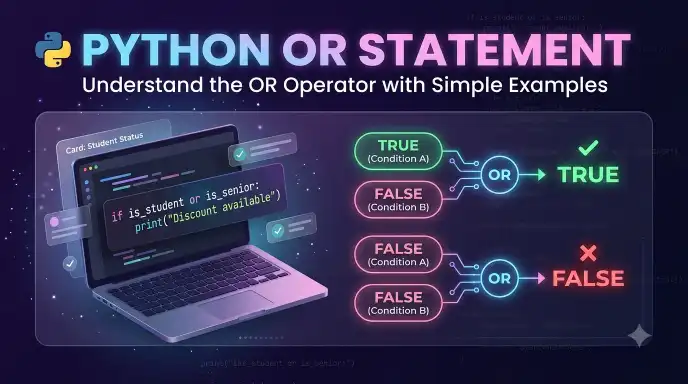
The Python or operator checks if at least one of two or more conditions is true, making it useful for decision making, validation, and controlling program behaviour. Although people often search for “Python OR statement,” or is technically a Boolean operator rather than a standalone statement in Python.
Beginners commonly encounter or when learning if statements and conditional expressions. They may wonder how it differs from and, how Python evaluates multiple conditions, or why an expression using or sometimes returns a value other than True or False. Understanding these details makes conditional code easier to read, write, and debug.
Python uses the lowercase keyword or to combine expressions logically. For example, a program can check if a person qualifies for a discount because they are a student or a older citizen. If either condition is true, the combined condition is true.
In this guide, you will learn what the Python OR operator means, how its syntax works, how Python evaluates conditions, and how to use it through practical examples. You will also discover the difference between logical OR and related operators so you can write clearer, more reliable Python programs.
Python OR Statement : Quick Answer
The Python or operator returns a truthy result when at least one of its operands is truthy. When used with Boolean conditions, it evaluates to True if either condition is true and False if both conditions are false.
For example:
age = 17
has_permission = True
if age >= 18 or has_permission:
print(“Access allowed”)
Output:
Access allowed
The first condition, age >= 18, is false because the person’s age is 17. The second condition, has_permission, is true. Because at least one condition is true, the if block runs.
Here is another simple example:
temperature = 30
if temperature < 0 or temperature > 25:
print(“Temperature is outside the preferred range”)
Output:
Temperature is outside the preferred range
The temperature is greater than 25, so the second condition is true.
Quick rule: Use or when any one of multiple conditions can be enough to make a decision.
Definition and Meaning of the Python OR Statement
The Python or operator is a logical operator that combines two expressions. It is commonly used with comparisons and Boolean values to determine what a program should do.
In everyday language, or presents alternatives. Python follows a similar idea: when the operator combines Boolean conditions, the overall condition is true if at least one condition is true.
What Does OR Mean in Python?
In Python, or means that one or more alternatives can satisfy the expression.
Consider this example:
is_weekend = True
is_holiday = False
print(is_weekend or is_holiday)
Output:
True
The first variable is true, so the complete expression evaluates to true even though the second variable is false.
Now consider a situation where both conditions are false:
is_weekend = False
is_holiday = False
print(is_weekend or is_holiday)
Output:
False
Neither condition is true, so the combined expression is false.
Is OR a Statement or an Operator?
Although Python OR statement is a common search phrase, or is technically a Boolean operator. A statement performs an action or controls program execution, while an operator combines or transforms values within an expression.
For example:
if is_weekend or is_holiday:
print(“Enjoy your day off”)
In this code:
- or is the logical operator.
- is_weekend or is_holiday is the combined expression.
- if is the conditional statement.
- print() displays the message when the condition is satisfied.
Understanding this distinction helps you use Python terminology accurately without losing sight of the practical purpose of the or keyword.
When Should You Use OR in Python?
Use or when a program should proceed if at least one condition is satisfied.
Common situations include:
- Allowing access when a user meets one of several requirements.
- Checking if a number is below or above an acceptable range.
- Displaying a message when either of two events occurs.
- Providing a default value when an existing value is missing or empty.
- Validating user input against multiple acceptable options.
For example:
username = “”
if username == “” or username == “guest”:
print(“Please choose a personal username”)
The message appears because the username is empty. The program would also display the message if the username were “guest”.
Remember: or is useful when your program needs alternatives instead of requiring every condition to be true.
How the OR Operator Works in Python
Python evaluates the or operator from left to right. In a Boolean condition, the result is true when the first condition is true or when the second condition is true. The result is false only when both conditions are false.
However, Python’s or operator has an important feature called short circuit evaluation. It means Python may stop evaluating the expression as soon as the result is already determined.
Understanding the OR Truth Table
The following table shows how or behaves when both operands are Boolean values.
| First condition | Second condition | Result |
| True | True | True |
| True | False | True |
| False | True | True |
| False | False | False |
Notice that three combinations produce True. Only the combination in which both conditions are false produces False.
For example:
print(True or True)
print(True or False)
print(False or True)
print(False or False)
Output:
True
True
True
False
These results show why or is helpful when alternative conditions can lead to the same action.
What Is Short Circuit Evaluation?
Short circuit evaluation means Python does not always need to evaluate both sides of an or expression.
If the left operand is truthy, Python returns that operand immediately because the second operand cannot change the outcome of the logical OR operation.
For example:
print(True or False)
Python already knows that the expression is truthy after evaluating the first operand. It does not need to evaluate the second operand.
The same behaviour can be demonstrated with a function:
def check_status():
print(“Function executed”)
return True
result = True or check_status()
print(result)
Output:
True
The message “Function executed” does not appear because Python never calls check_status(). The left operand is already true, so evaluating the function is unnecessary.
This behaviour can improve efficiency, but it also matters when the second expression performs an action or raises an error. Do not rely on a function being called on the right side of or when the left side may already be truthy.
Key takeaway: Python stops evaluating an or expression once it encounters a truthy operand that determines the result.
Basic Python vs Statement Examples
The easiest way to learn the or operator is to practise using it in small programs. These examples show how it works in everyday programming situations.
Example 1: Checking Two Conditions
marks = 85
attendance = 60
if marks >= 80 or attendance >= 75:
print(“Eligible for consideration”)
else:
print(“Not eligible”)
Output:
Eligible for consideration
The marks condition is true because the student scored 85. The attendance condition is false because attendance is 60. Since one condition is true, the program prints the eligibility message.
Example 2: Checking a Number
number = 5
if number < 0 or number > 100:
print(“Number is outside the range”)
else:
print(“Number is within the range”)
Output:
Number is outside the range
The number is negative, so the first condition is true. Python does not need the second condition to be true for the if block to run.
Example 3: Checking User Input
choice = “yes”
if choice == “yes” or choice == “y”:
print(“You selected yes”)
else:
print(“You selected no”)
Output:
You selected yes
The program accepts either “yes” or “y” as an affirmative response. This is a common way to handle simple input alternatives.
Example 4: Providing a Default Value
Python’s or operator can also return an actual value instead of only True or False.
name = “”
display_name = name or “Guest”
print(display_name)
Output:
Guest
An empty string is considered false in Python. Because name is empty, the expression returns “Guest”.
If the variable contained a non empty string, Python would return that string instead:
name = “Aisha”
display_name = name or “Guest”
print(display_name)
Output:
Aisha
This technique can be convenient when selecting a fallback value. However, it treats any falsy value as missing, including 0 and False. If those are valid values in your program, an explicit check may be more appropriate.
Important: Unlike Boolean comparisons, or does not always return the Boolean values True or False. It returns one of its operands according to Python’s truth value rules.
Difference Between OR and AND in Python
Python provides both or and and logical operators, but they behave differently. The or operator requires at least one operand to be truthy, while the and operator requires both operands to be truthy for the combined expression to be truthy.
Understanding this difference is essential when writing conditions involving multiple requirements.
How OR Works Compared with AND
Consider the following examples:
age = 20
has_ticket = False
print(age >= 18 or has_ticket)
print(age >= 18 and has_ticket)
Output:
True
False
The first expression returns True because the age condition is satisfied. The second expression returns False because the user does not have a ticket.
Here is a comparison of the two operators:
| Feature | or | and |
| Main purpose | Combine alternatives | Combine requirements |
| When the result is truthy | At least one operand is truthy | Both operands are truthy |
| When Boolean result is false | Both operands are false | At least one operand is false |
| Common use | Multiple acceptable options | Multiple required conditions |
| Example | Member OR guest | Member AND verified |
When Should You Use OR?
Use or when several alternatives can lead to the same result.
day = “Saturday”
if day == “Saturday” or day == “Sunday”:
print(“It is the weekend”)
else:
print(“It is a weekday”)
Output:
It is the weekend
The program displays the weekend message because the day is Saturday. The same result would occur if the day were Sunday.
When Should You Use AND?
Use and when multiple conditions must be satisfied together.
age = 22
has_id = True
if age >= 18 and has_id:
print(“Entry requirements satisfied”)
else:
print(“Entry requirements not satisfied”)
Output:
Entry requirements satisfied
Both conditions are true, so the program enters the first block.
Remember: Use or for alternatives and and for combined requirements. Choosing the correct operator makes your program’s logic more accurate.
OR Operator Precedence in Python
Operator precedence determines which operations Python evaluates first when an expression contains multiple operators.
In Python, and has higher precedence than or. This means Python evaluates an and expression before combining its result with or, unless parentheses specify a different order.
For example:
result = True or False and False
print(result)
Output:
True
Python interprets the expression as:
result = True or (False and False)
The and operation produces False. The remaining expression becomes True or False, which evaluates to True.
How Parentheses Change the Result
Parentheses allow you to group conditions and make the intended order explicit.
Compare these expressions:
print(True or False and False)
print((True or False) and False)
Output:
True
False
The first expression evaluates and before or, resulting in True. In the second expression, parentheses make Python evaluate True or False first. That result is then combined with False using and, producing False.
Why Should You Use Parentheses?
Even when you know Python’s precedence rules, parentheses can make complex conditions easier to understand.
For example:
age = 16
has_permission = True
is_member = False
if (age >= 18 or has_permission) and is_member:
print(“Access granted”)
else:
print(“Access denied”)
Output:
Access denied
The expression inside the parentheses is true because the user has permission. However, is_member is false. Since the complete expression uses and, both parts must be true for access to be granted.
Practical tip: Use parentheses when combining several and and or conditions. Clear grouping reduces confusion and helps prevent logical errors.
Common Mistakes with the python or statement
Beginners often understand the basic meaning of or but still make mistakes when combining conditions or testing values. Learning to recognize these errors will help you write more reliable Python code.
Mistake 1: Using or When Both Conditions Must Be True
Suppose a user must be at least 18 years old and have a valid identification document.
Incorrect approach:
age = 16
has_id = True
if age >= 18 or has_id:
print(“Access granted”)
Output:
Access granted
This result is incorrect if both requirements are mandatory. The or operator allows either condition to satisfy the expression.
Correct approach:
age = 16
has_id = True
if age >= 18 and has_id:
print(“Access granted”)
else:
print(“Access denied”)
Output:
Access denied
Use and when every requirement must be met.
Mistake 2: Writing an Incomplete Range Check
A common error occurs when checking if a number falls outside a range.
Incorrect code:
number = 50
if number < 10 or number > 100:
print(“Outside range”)
This code is actually correct for checking if a number is outside the range from 10 to 100. However, changing or to and would make the condition impossible to satisfy for an ordinary number.
If you want to check if a number is inside the range, use:
number = 50
if number >= 10 and number <= 100:
print(“Inside range”)
Output:
Inside range
Python also supports chained comparisons:
if 10 <= number <= 100:
print(“Inside range”)
This is often the clearest way to test if a number falls within a range.
Mistake 3: Repeating a Variable Incorrectly
Consider this condition:
color = “blue”
if color == “red” or “blue”:
print(“Color accepted”)
Output:
Color accepted
This code does not compare color with both colors. The string “blue” is a non empty string and therefore truthy, so the condition always succeeds.
The correct approach is:
color = “blue”
if color == “red” or color == “blue”:
print(“Color accepted”)
Output:
Color accepted
Alternatively, use the membership operator:
if color in (“red”, “blue”):
print(“Color accepted”)
This approach is convenient when checking several acceptable values.
Mistake 4: Forgetting That OR Returns an Operand
When both operands are Boolean values, the result behaves as expected: True or False. However, when other data types are used, Python returns one of the original operands.
For example:
print(0 or 25)
print(“Hello” or “Welcome”)
Output:
25
Hello
Zero is falsy, so Python returns 25. A non empty string is truthy, so Python returns “Hello” without needing the second operand.
Correction: Remember that or does not always produce a Boolean value. Consider truthiness when using it with strings, numbers, lists, and other objects.
Mistake 5: Ignoring Short Circuit Evaluation
Python may skip the second operand when the first operand determines the result.
def show_message():
print(“The function ran”)
return True
result = True or show_message()
print(result)
Output:
True
The function does not run because the first operand is already truthy.
Correction: Avoid placing an essential action on the right side of or if the action must always occur.
Python OR Operator in Everyday Examples
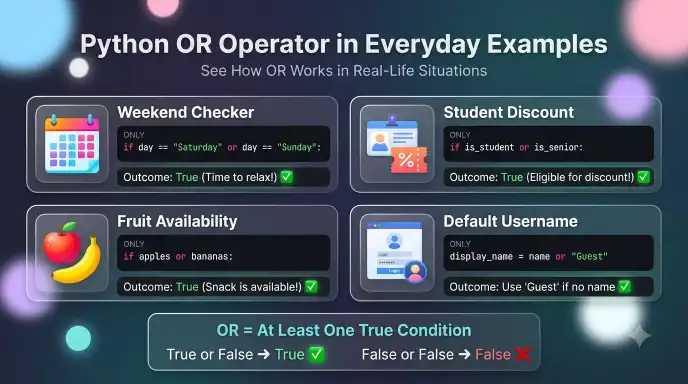
The or operator is useful in many real world programs. It can simplify decisions, check multiple acceptable options, and determine if a program should perform an action.
Example 1: Checking a Weekend
day = “Sunday”
if day == “Saturday” or day == “Sunday”:
print(“Enjoy your weekend!”)
else:
print(“Have a productive weekday!”)
Output:
Enjoy your weekend!
The program checks two possible days. Either Saturday or Sunday satisfies the condition.
Example 2: Validating a Login
username = “admin”
password = “python123”
if username == “admin” or password == “python123”:
print(“At least one credential matches”)
else:
print(“Neither credential matches”)
Output:
At least one credential matches
This example demonstrates how or works, but it is not a secure login check. A real authentication system should validate the username and password together and use appropriate security practices.
Example 3: Checking Product Availability
apples_available = False
bananas_available = True
if apples_available or bananas_available:
print(“Fruit is available”)
else:
print(“No fruit is available”)
Output:
Fruit is available
The program displays the message because bananas are available, even though apples are not.
Example 4: Handling Empty Input
user_name = “”
if user_name == “” or user_name is None:
print(“Please enter your name”)
else:
print(“Welcome!”)
Output:
Please enter your name
The variable contains an empty string, so the program asks the user to provide a name. The explicit checks distinguish an empty string from None.
An alternative for checking if a string is empty or contains only whitespace is:
user_name = ” “
if not user_name.strip():
print(“Please enter a valid name”)
Output:
Please enter a valid name
The strip() method removes whitespace from the beginning and end of the string, allowing the program to detect input that contains only spaces.
Example 5: Offering Alternative Discounts
is_student = False
is_senior = True
if is_student or is_senior:
print(“Discount available”)
else:
print(“Standard price applies”)
Output:
Discount available
Either status qualifies the customer for a discount. The program does not require the customer to be both a student and a senior.
Example 6: Choosing a Fallback Value
nickname = “”
display_name = nickname or “Guest”
print(display_name)
Output:
Guest
Python uses “Guest” because the nickname is an empty string. This pattern can be useful when a fallback is suitable for every falsy value. If a valid value such as 0 or False must be preserved, use a more specific condition instead.
These examples show how the or operator supports everyday programming tasks. The main principle remains the same: use or when at least one acceptable condition is enough to proceed.
Frequently Asked Questions about python or statement
Q1. What does the OR operator do in Python?
The or operator combines expressions and returns a truthy result when at least one operand is truthy. With Boolean operands, it returns True if either operand is true and False if both operands are false.
Q2. Is OR a statement or an operator in Python?
or is a logical operator, not a standalone statement. It is commonly used inside an if statement to combine conditions and control program execution.
Q3. What is the syntax for OR in Python?
The basic syntax is:
condition1 or condition2
For example:
if age < 18 or age > 65:
print(“Age falls outside the specified range”)
The condition is truthy if either comparison is true.
Q4. What is the difference between OR and AND?
or requires at least one truthy operand to produce a truthy result. and requires both operands to be truthy. Use or for alternatives and and when multiple requirements must be satisfied.
Q5. Can Python OR have more than two conditions?
Yes. You can combine several conditions using or.
day = “Friday”
if day == “Friday” or day == “Saturday” or day == “Sunday”:
print(“Special schedule”)
The condition is truthy when any one of the three comparisons is true.
Q6. Does Python OR always return True or False?
No. When used with non Boolean objects, or returns one of its operands. For example, 0 or 10 returns 10, while “Hello” or “World” returns “Hello”.
Q7. Does Python evaluate both sides of OR?
Not always. Python uses short circuit evaluation. If the left operand is truthy, Python returns it without evaluating the right operand. Otherwise, Python evaluates and returns the right operand.
Q8. How do you write OR in Python?
Write the lowercase keyword or between expressions:
if condition_a or condition_b:
print(“At least one condition is satisfied”)
Python keywords are case sensitive, so use or, not OR or Or.
Final Thoughts
The Python or operator is a fundamental tool for combining conditions and making decisions in a program. It allows your code to continue when at least one condition is satisfied, making it useful for input validation, alternative choices, range checks, and many other programming tasks.
The most important distinction is between or and and. Use or when one condition is enough, and use and when every condition must be true. Also remember that Python’s or operator can return an operand rather than a Boolean value, and short circuit evaluation can prevent the right hand expression from running.
With regular practice, these rules become easier to recognize. Start with simple conditions, test each expression, and use parentheses when combining several logical operators.
The key takeaway: Understanding how or works will help you write clearer conditional statements, avoid common logic errors, and build more reliable Python programs.
LEARN MORE!

I’m a grammar writer focused on making English rules, word usage, and sentence structure simple and easy to understand.








1 thought on “Python OR Statement: Understand Its Logic with Code Examples”